





Book

How to connect hearing aids to the Remote Control 3.0

Go back to hearing aid maintenance videos

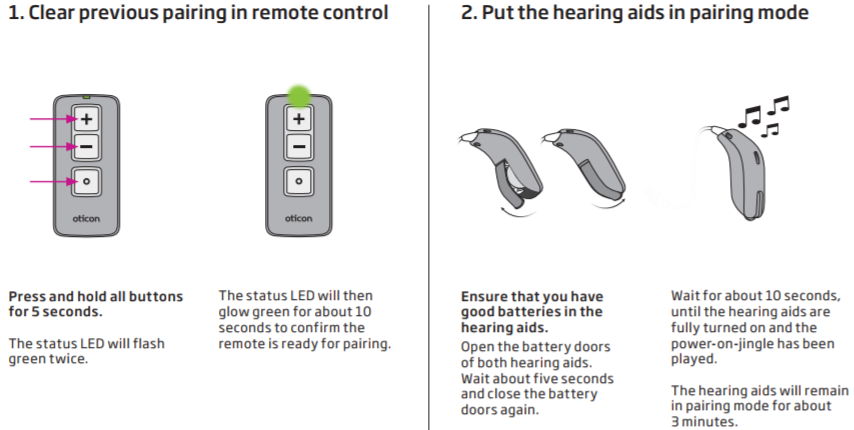
The image provides instructions for pairing Oticon hearing aids with a remote control. 
					
					'Step 1: Clear previous pairing in remote control'  
					- 'Object:' Remote control with '+' and '-' buttons and an On/Off button.  
					- 'Action:' Press and hold all buttons for 5 seconds. The status LED flashes green twice, then glows green for 10 seconds.  
					- 'Context:' Preparing the remote for pairing.  
					'Text:'  
					'Press and hold all buttons for 5 seconds.  
					The status LED will flash green twice.  
					The status LED will then glow green for about 10 seconds to confirm the remote is ready for pairing.'
					
					'Step 2: Put the hearing aids in pairing mode'  
					- 'Object:' Three Oticon hearing aids.
					- 'Action:' Open battery doors, wait five seconds, and close them. Wait for 10 seconds as hearing aids turn on and play the power-on jingle.  
					- 'Context:' Hearing aids enter pairing mode for 3 minutes.  
					'Text:'  
					'Ensure that you have good batteries in the hearing aids.  
					Open the battery doors of both hearing aids.  
					Wait about five seconds and close the battery doors again.  
					Wait

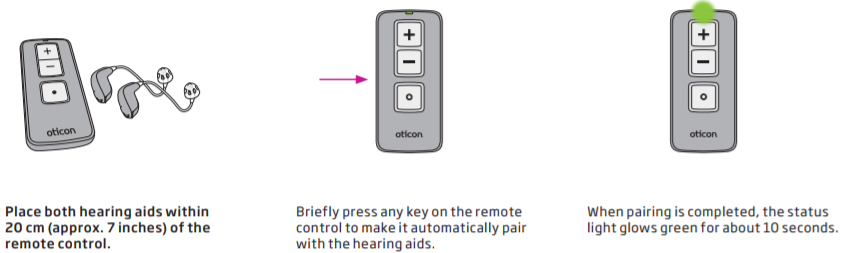
A step-by-step guide illustrates pairing Oticon hearing aids with a remote control. 'Text transcription:' 
					
					1. 'Place both hearing aids within 20 cm (approx. 7 inches) of the remote control.'
					
					2. 'Briefly press any key on the remote control to make it automatically pair with the hearing aids.'
					
					3. 'When pairing is completed, the status light glows green for about 10 seconds.'
					
					The visual highlights Oticon branding, emphasizing hearing aid pairing instructions for optimal functionality and convenience.